
The model
Think of Avibe as the layer between your machine and the way you already work:- Substrate — your own machine becomes the place the agent runs and lives.
- Inhabitant — Vibey, Avibe’s own agent, or an official first-party agent (Claude Code, Codex, or OpenCode) is the partner living there.
- Interface — you talk to it from a browser Workbench, or from Slack, Discord, Telegram, WeChat, and Lark.
- Access —
vibe remotegives that machine a public address through the avibe.bot tunnel, so you can reach it from anywhere.
What makes it different
Local-first, and yours
Your AI partner, its execution, and its local state stay on your own machine. Remote Web UI returns to that machine through a secure tunnel. Model-backed features use the providers you choose or the models supplied for Avibe features. The Local-first boundary inventory shows exactly what crosses the network in each mode. This is an architectural stance, not a setting.Its own agent, and every first-party agent
Avibe ships its own official agent, Vibey: built in, always on, and able to run the platform for you once it has a model from Model Hub. Alongside it, Avibe drives the official Claude Code, Codex, and OpenCode directly — not a cut-down embedded copy. Bring your own subscription or API keys, switch agents per task, and never get locked into one vendor’s silo. → Vibey · Claude Code · OpenCode · CodexIt keeps its own timeline
The Agent Harness gives your partner durable primitives — run a job, schedule a time trigger, watch a condition, inspect history — so it can act without you pressing a button. → Commands The Runs graph makes Agent-to-Agent delegation inspectable: see which Session started each background Agent, where its result reports back, and the execution history behind every node.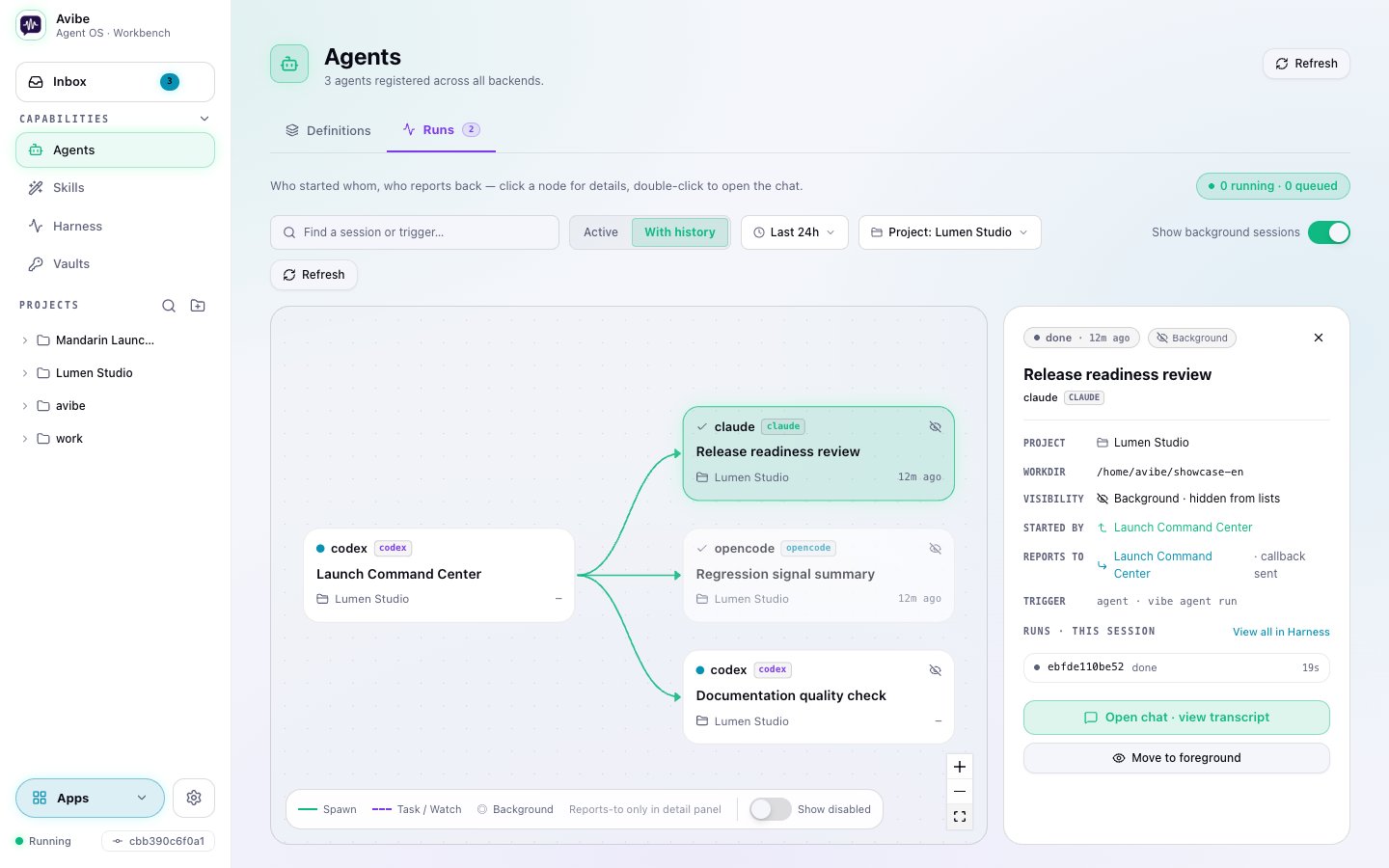
It can show, not just tell
Show Pages let the agent hand you a live web page — a dashboard, a diagram, a diff, a report — reachable from your phone through the same tunnel.Where to go next
- Install and run: Quickstart
- What stays on your machine: Local-first
- One thread, one session: Thread sessions
- Reach it from anywhere: Remote UI
- Control secret delivery: Vaults
- Why we built it this way: Design Philosophy
- The bigger picture: Vision